Categories: AI Video Workflow, Creator Strategy, Production Process
Tags: unboundai, ai creation studio, ai video workflow, content strategy, creator toolkit
Introduction
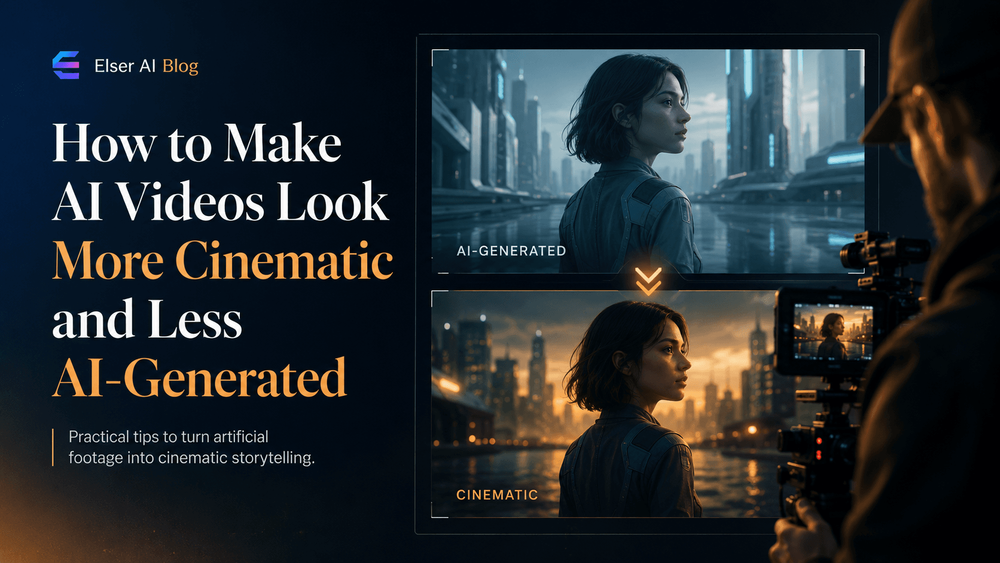
Creating cinematic AI videos requires more than just adding the word "cinematic" to your prompts. It's about direction, intention, and attention to detail. Many AI videos look AI-generated because they lack visual hierarchy, with everything in the scene receiving the same level of detail and visual importance. Real cinematography, on the other hand, tells the viewer where to look and what to feel. In this guide, we'll explore how to make AI videos look more cinematic and less AI-generated using better lighting, camera language, composition, pacing, and a practical creative workflow with UnboundAI.
Why AI Videos Often Look “AI-Generated”
The lack of visual hierarchy is a key reason why many AI videos look AI-generated. Unlike real cinematography, which guides the viewer's attention and creates a sense of depth and emotion, AI videos often present a flat, uniform visual landscape. To create more cinematic AI videos, it's essential to introduce visual hierarchy, directing the viewer's attention to specific elements in the scene.
Start with Cinematic Intent, Not Cinematic Keywords
Simply adding "cinematic" to your prompts is not enough. To create truly cinematic AI videos, you need to define the emotion, mood, and atmosphere you want to convey. This means moving beyond generic keywords and focusing on the specific elements that will bring your vision to life. By starting with a clear cinematic intent, you can create AI videos that are more directed, more intentional, and more engaging.
Use Motivated Lighting
Motivated lighting is one of the simplest ways to make AI videos look less artificial. Instead of asking for "beautiful lighting," describe where the light comes from and how it interacts with the scene. This will help create a more realistic and immersive visual environment, drawing the viewer into the world of your AI video.
Make Camera Movement Human
AI cameras often feel too perfect, gliding through space without weight or motivation. To make AI videos look more cinematic, it's essential to introduce human-like camera movement, with a sense of intention and physical plausibility. This will help create a more immersive and engaging visual experience, drawing the viewer into the world of your AI video.
Compose the Frame Like a Real Shot
Composition is what separates a screenshot from a frame. AI often places the subject in the center with a balanced background, which can look clean but generic. To create more cinematic AI videos, it's essential to compose the frame like a real shot, introducing depth, texture, and visual interest. This will help create a more immersive and engaging visual environment, drawing the viewer into the world of your AI video.
Slow Down the Pace
A common AI video mistake is trying to show too much too quickly. Fast motion can hide flaws, but it also prevents emotional connection. Cinematic videos often work because they let the viewer observe, absorb, and reflect on the visual landscape. By slowing down the pace, you can create AI videos that are more engaging, more immersive, and more memorable.
Add Imperfection, But Not Errors
Real footage is rarely perfectly clean. It may have slight handheld motion, atmospheric haze, lens softness, natural shadows, background movement, or tiny timing imperfections. These details create believability, making the AI video feel more real and more relatable. By introducing imperfection, but not errors, you can create AI videos that are more cinematic, more engaging, and more memorable.
Use UnboundAI as a Cinematic Workflow Layer
The biggest challenge in cinematic AI video is consistency. You may generate one excellent shot, but the next shot looks like a different project. This is where UnboundAI comes in, providing a cinematic workflow layer that helps you create consistent, high-quality AI videos. With UnboundAI, you can streamline your production process, reduce random editing loops, and create AI videos that are more cinematic, more engaging, and more memorable.
A Practical Cinematic AI Video Prompt Template
To create more cinematic AI videos, it's essential to have a clear and practical prompt template. Here's an example:
"Create a cinematic AI video scene showing [subject/action]. The mood is [emotion]. Lighting comes from [motivated source]. Camera: [specific movement and framing]. Composition: [placement/depth]. Motion should be natural and restrained. Preserve [character/product/style details]."
This template provides a clear and concise framework for creating cinematic AI videos, helping you to define the emotion, mood, and atmosphere you want to convey.
Final Thoughts
Making AI videos look more cinematic and less AI-generated is not about adding more style words. It's about direction, intention, and attention to detail. By defining the emotion, using motivated lighting, keeping camera movement human, composing intentionally, slowing down the pace, and adding believable imperfection, you can create AI videos that are more engaging, more immersive, and more memorable.
Practical Weekly Workflow
- Choose 2 to 3 blocks from this article and define a weekly objective.
- Build a concise first draft for each selected block.
- Improve structure, tone, and clarity before publishing.
- Compare variants using a single measurable KPI.
- Keep only the formats that consistently outperform baseline.
Conclusion
The most reliable way to scale content output is to standardize how each piece is produced. By keeping the structure stable, iterating by section, and scaling only what proves performance, you can create a consistent and high-quality stream of AI videos. With UnboundAI, you can streamline your production process, reduce random editing loops, and create AI videos that are more cinematic, more engaging, and more memorable.
Next Step
Explore UnboundAI workflow templates: https://unboundai.net
FAQs
1) Can this workflow work for a solo creator?
Yes. Start with a small weekly scope and reuse the same production blocks.
2) How many variants should I test per post?
2 to 4 focused variants are usually enough to identify clear winners.
3) Should I prioritize trends or consistency?
Use trends for reach, but keep a consistent format system for long-term brand memory.
Media References
- https://cdn.unboundai.net/blog/how-to-make-ai-videos-look-more-cinematic-and-less-ai-generated/20260703110536-mkssatb8.png
- https://cdn.unboundai.net/blog/how-to-make-ai-videos-look-more-cinematic-and-less-ai-generated/20260703110537-81dh9gmv.jpg
- https://cdn.unboundai.net/blog/how-to-make-ai-videos-look-more-cinematic-and-less-ai-generated/20260703110538-vrjzkkyj.jpg
- https://cdn.unboundai.net/blog/how-to-make-ai-videos-look-more-cinematic-and-less-ai-generated/20260703110539-kl2zlcma.jpg