Categories: AI Video Workflow, Creator Strategy, Production Process
Tags: unboundai, ai creation studio, ai video workflow, content strategy, creator toolkit
Introduction
AI video workflows are useful only when they make production clearer, not just faster. This guide explains the core ideas behind What Is Character Consistency in AI Video? | UnboundAI and turns them into a practical creator workflow for planning, generating, editing, and publishing video with UnboundAI.
The goal is to keep the source article's structure intact while translating it into decisions a creator can actually use: what the concept means, where it fits in a production pipeline, when it helps, and what to check before calling a clip finished.
Core Content Blocks
1) What Does Character Consistency Include?
The face is important, but a character’s identity is made from several visual anchors:
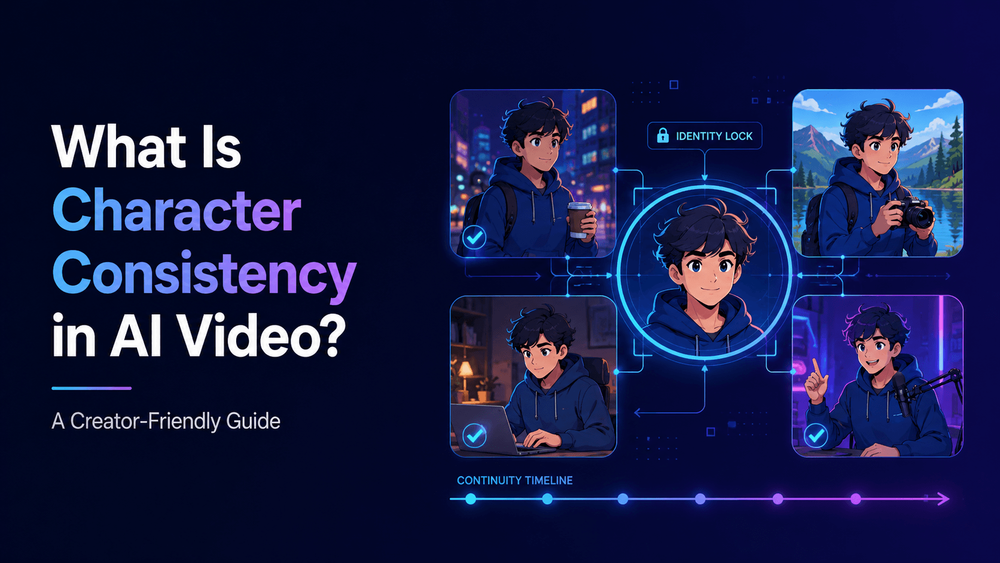
Character consistency in AI video means keeping the same character visually recognizable across frames, shots, scenes, and videos.
2) Why AI Video Characters Change
AI video characters change because each generation involves interpretation.
A consistent character keeps the same face, hairstyle, outfit, body proportions, color palette, accessories, art style, and overall identity. The character can move, react, speak, change expression, or appear in different locations, but the viewer should still recognize them as the same person or character.
3) Why Character Consistency Matters
Character consistency matters because storytelling depends on recognition.
This sounds simple, but it is one of the hardest problems in AI video generation.
4) How to Improve Character Consistency
The first step is to create a strong reference image. The character should be clear, well-lit, and visually readable. A front or three-quarter view is usually better than an extreme angle. The face, hairstyle, outfit, and body shape should be visible.
A creator might generate a beautiful anime character in one shot. In the next shot, the face becomes slightly different. The eye shape changes. The outfit shifts. The hairstyle becomes longer. The character looks older. The art style moves from clean anime to semi-realistic 3D. By the third or fourth shot, the original character is gone.
5) Character Consistency Prompt Template
“Use the same character from the reference image. Preserve the exact character identity: [face, eyes, hairstyle, outfit, body proportions, accessories, colors, and style]. In this shot, the character [specific action]. Camera: [movement]. Lighting: [style]. Keep the character recognizable across the entire clip. Do not change [protected details].”
For one-off clips, this may not matter much. But for anime episodes, YouTube Shorts series, virtual influencers, product mascots, comic-to-video stories, music videos, dialogue scenes, and brand characters, consistency is essential. Viewers need to trust that they are watching the same character.
6) Character Consistency in Image-to-Video
Image-to-video is often better for character consistency because the AI starts from a visual reference. Instead of asking the model to invent the character from text, you give it the character image.
For example, an anime character might be recognized by short silver hair, green eyes, round glasses, an oversized orange hoodie, black shorts, a small tool bag, compact body proportions, and an energetic expression. If the hoodie changes to armor or the glasses disappear, the character may no longer feel like the same person.
7) How UnboundAI Helps with Character Consistency
UnboundAI helps creators build AI videos from visual references and controlled prompts. If you want a recurring character, you can create or upload the character first, then generate multiple video scenes around that same visual identity.
For a mascot, the head shape, colors, logo placement, and body shape may matter more than facial details. For a realistic virtual presenter, facial structure, age, hairstyle, skin tone, and clothing may matter most.
8) Final Thoughts
Character consistency in AI video means preserving the same character identity across frames, clips, and scenes. It includes face, hair, outfit, body shape, colors, accessories, style, and personality cues.
A good AI video workflow defines these identity anchors before generation.
Practical Weekly Workflow
- Define the content outcome first: short ad, story scene, tutorial clip, music visual, product demo, or social post.
- List the required inputs: prompt, reference image, product shot, character design, storyboard frame, script, or audio.
- Generate or edit in small passes instead of trying to finish the whole video in one attempt.
- Review the clip for continuity, pacing, visual clarity, caption space, sound needs, and platform format.
- Save the prompt, source assets, and export settings so the next variation is easier to reproduce.
Conclusion
AI-assisted video work is strongest when it is treated as a repeatable production system. The creative idea still matters, but the workflow also needs clear inputs, controlled iteration, and a review step that turns raw generations into finished communication.
Next Step
Explore UnboundAI workflow templates: https://unboundai.net
FAQs
1) Can this workflow work for a solo creator?
Yes. Start with one repeatable format, keep the asset list small, and improve the workflow after each published clip.
2) Should I generate first or write the edit plan first?
Write a short plan first. Even a simple outline helps you judge whether the AI output supports the final video.
3) What should I check before publishing an AI video?
Check continuity, motion quality, captions, sound, aspect ratio, pacing, and whether the video communicates the intended
idea without extra explanation.
4) How does UnboundAI fit into this workflow?
Use UnboundAI where visual generation or variation is needed, then combine the resulting clips with editing, captions,
audio, and platform-specific formatting.